JavaSwing不规则窗体
JAVA程序的外表总是一板一眼的,看多了难免审美疲劳,能不能使我们的JAVA程序外观变得更美观更独特呢?答案是肯定的,我们可以让JAVA程序根据图片来生成自定义的不规则窗体。比如下图的这种外观:
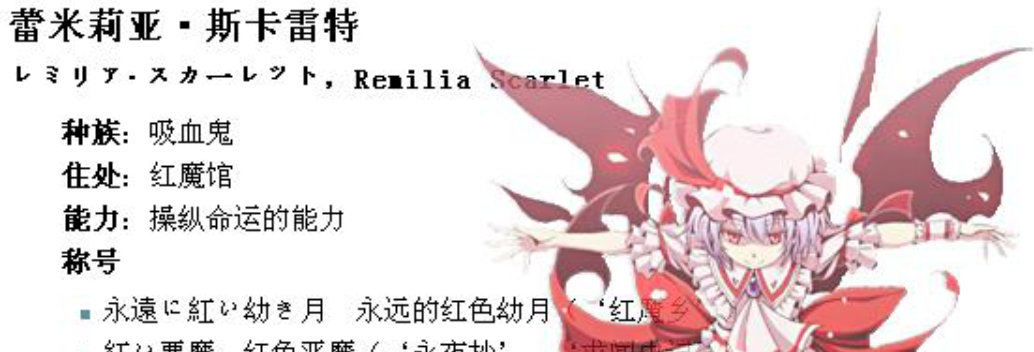
首先要说明一下,本方法是基于com.sun.awt.AWTUtilities这个类实现的,而这个类只能在jdk-6u10版本以后的版本才能体现出来的,在本文中讨论的所有 API 在新 com.sun.awt.AWTUtilities 类中出现,该类不是官方支持的部分 API。它在 Java SE 7 中的位置最有可能发生改变,签名方法可能在现在和最终的 Consumer JRE 发行之间发生轻微变化。
JDK地址:http://java.sun.com/javase/downloads/index.jsp
代码示例:
1
2
3
4
5
6
7
8
9
10
11
12
13
14
15
16
17
18
19
20
21
22
23
24
25
26
27
28
29
30
31
32
33
34
35
36
37
38
39
40
41
42
43
44
45
46
47
48
49
50
51
52
53
54
55
56
57
58
59
60
61
62
63
64
65
66
67
68
69
70
71
72
73
74
75
76
77
78
79
80
81
82
83
84
85
86
87
88
89
90
91
92
93
94
95
96
97
98
99
100
101
102
103
104
105
106
107
108
109
110
111
112
113
114
115
116
117
118
119
120
121
122
123
124
125
126
127
128
129
130
131
132
133
134
135
136
137
138
139
140
141
142
143
144
145
146
147
148
149
150
151
152
153
154
155
156
157
158
159
160
161
162
163
164
165
166
167
168
169
170
171
172
173
174
175
176
177
178
179
180
181
182
183
184
185
186
187
188
189
190
191
192
193
194
195
196
197
198
199
200
201
202
203
204
205
206
207
208
209
210
211
212
| import java.awt.Graphics;
import java.awt.Image;
import java.awt.MediaTracker;
import java.awt.Point;
import java.awt.Rectangle;
import java.awt.Shape;
import java.awt.Toolkit;
import java.awt.event.MouseAdapter;
import java.awt.event.MouseEvent;
import java.awt.event.MouseMotionAdapter;
import java.awt.geom.Area;
import java.awt.image.PixelGrabber;
import java.io.IOException;
import java.util.ArrayList;
import javax.swing.JFrame;
import com.sun.awt.AWTUtilities;
public class IrregularFormSample extends JFrame {
private static final long serialVersionUID = 1L;
private Point origin;
private Image img;
public IrregularFormSample() {
super();
MediaTracker mt=new MediaTracker(this);
img=Toolkit.getDefaultToolkit().createImage("remi.png");
mt.addImage(img, 0);
try {
mt.waitForAll();
} catch (InterruptedException e) {
e.printStackTrace();
}
try {
initialize();
} catch (IOException e) {
e.printStackTrace();
}
}
private void initialize() throws IOException {
this.setSize(img.getWidth(null), img.getHeight(null));
this.setUndecorated(true);
this.origin=new Point();
AWTUtilities.setWindowShape(this,getImageShape(img));
AWTUtilities.setWindowOpacity(this, 0.8f);
this.setLocationRelativeTo(null);
addMouseListener(
new MouseAdapter(){
public void mousePressed(MouseEvent e){
origin.x = e.getX();
origin.y = e.getY();
}
public void mouseClicked(MouseEvent e) {
if(e.getButton()==MouseEvent.BUTTON3)
System.exit(0);
}
public void mouseReleased(MouseEvent e) {
super.mouseReleased(e);
}
@Override
public void mouseEntered(MouseEvent e) {
repaint();
}
}
);
addMouseMotionListener(
new MouseMotionAdapter(){
public void mouseDragged(MouseEvent e){
Point p = getLocation();
setLocation(p.x + e.getX() - origin.x, p.y + e.getY() - origin.y );
}
}
);
}
public Shape getImageShape(Image img) {
ArrayList<Integer> x=new ArrayList<Integer>();
ArrayList<Integer> y=new ArrayList<Integer>();
int width=img.getWidth(null);
int height=img.getHeight(null);
PixelGrabber pgr = new PixelGrabber(img, 0, 0, -1, -1, true);
try {
pgr.grabPixels();
} catch (InterruptedException ex) {
ex.getStackTrace();
}
int pixels[] = (int[]) pgr.getPixels();
for (int i = 0; i < pixels.length; i++) {
int alpha = getAlpha(pixels[i]);
if (alpha == 0){
continue;
}else{
x.add(i%width>0 ? i%width-1:0);
y.add(i%width==0 ? (i==0 ? 0:i/width-1):i/width);
}
}
int[][] matrix=new int[height][width];
for(int i=0;i<height;i++){
for(int j=0;j<width;j++){
matrix[i][j]=0;
}
}
for(int c=0;c<x.size();c++){
matrix[y.get(c)][x.get(c)]=1;
}
Area rec=new Area();
int temp=0;
for(int i=0;i<height;i++){
for(int j=0;j<width;j++){
if(matrix[i][j]==1){
if(temp==0)
temp=j;
else if(j==width){
if(temp==0){
Rectangle rectemp=new Rectangle(j,i,1,1);
rec.add(new Area(rectemp));
}else{
Rectangle rectemp=new Rectangle(temp,i,j-temp,1);
rec.add(new Area(rectemp));
temp=0;
}
}
}else{
if(temp!=0){
Rectangle rectemp=new Rectangle(temp,i,j-temp,1);
rec.add(new Area(rectemp));
temp=0;
}
}
}
temp=0;
}
return rec;
}
private int getAlpha(int pixel) {
return (pixel >> 24) & 0xff;
}
@Override
public void paint(Graphics g) {
super.paint(g);
g.drawImage(img, 0, 0, null);
}
public static void main(String[] args) {
IrregularFormSample sample = new IrregularFormSample();
sample.setDefaultCloseOperation(JFrame.EXIT_ON_CLOSE);
sample.setVisible(true);
}
}
|